

Document API Documents
API Documents
IPest is a dynamic tunnel proxy based on high-performance hosts- It’s more convenient and easier for users by switching IP on the cloud-
IPest currently offers data plans- Two flexible proxy access methods, username password authentication and IP extraction are provided for users to fit their own needs- IPest tunnel proxy supports both HTTP and Socks , provides a wealth of optional parameters, and can provide strong support for data acquisition-
IPest currently offers data plans- Two flexible proxy access methods, username password authentication and IP extraction are provided for users to fit their own needs- IPest tunnel proxy supports both HTTP and Socks , provides a wealth of optional parameters, and can provide strong support for data acquisition-
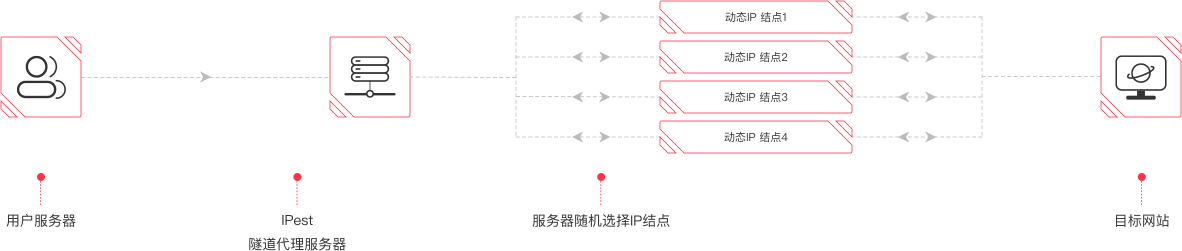
Novice users can use the tunnel proxy through the following steps:
1、After registering and placing an order successfully, check the order information in member Centre, and obtain the order id and the corresponding order key-
2、Choose a suitable method that suits you (username password authentication or proxy IP extraction) , and you can download the code sample in the corresponding language to access the target website via proxy- For related samples, please visit code samples as below-
1、After registering and placing an order successfully, check the order information in member Centre, and obtain the order id and the corresponding order key-
2、Choose a suitable method that suits you (username password authentication or proxy IP extraction) , and you can download the code sample in the corresponding language to access the target website via proxy- For related samples, please visit code samples as below-
Account password
 Back
Back
1- First of all, confirm your order is within the validity in member Centre, and there is remaining traffic on the order-
2- Generate password with tools or through code, rules of password as follows: MD5(orderID=order id&secret=order key&time=timestamp)-toLowerCase()- Please note that the timestamp is 10 bits ,and the unit is second- The characters need to be diminished after MD5 of the spliced key- The username of proxy authentication: proxy, and password is a dynamic one generated as above, valid for 1 hour-
3- Command-line test: in the case that your program is running on Linux, usability test is recommended before use, and then you do the business programming-
Test steps are as follows ( suppose your username and password: proxy, password):
2- Generate password with tools or through code, rules of password as follows: MD5(orderID=order id&secret=order key&time=timestamp)-toLowerCase()- Please note that the timestamp is 10 bits ,and the unit is second- The characters need to be diminished after MD5 of the spliced key- The username of proxy authentication: proxy, and password is a dynamic one generated as above, valid for 1 hour-
3- Command-line test: in the case that your program is running on Linux, usability test is recommended before use, and then you do the business programming-
Test steps are as follows ( suppose your username and password: proxy, password):
HTTP proxy
#add username and password
curl -v "http://pv.sohu.com/cityjson" -x username:password@flow.ipest.info:14223
#add Proxy-Authorization directly
curl -v -H "Proxy-Authorization Basic password" "
http://pv.sohu.com/cityjson" -x flow.ipest.info:14223
Socks proxy
#add username and password
curl -v "http://pv.sohu.com/cityjson" —socks5 username:password@flow.ipest.info:14224
Attachment: in the mode of account password, parameters are optional- Rule: add the parameters into MD5 encrypted string, splicing with &-
For account-password access, the service provider provides a set of proxies, including "proxy address", "proxy account", and "proxy password"- Users can use it directly or use it after extension with the proxy account- Multiple extended accounts can be used at the same time-
1- Example
Proxy address: flow-ipest-info:14223, proxy account: orderId_US_1007001__1_session, proxy password: *******
The proxy account consists of the order number, country code, state (province) code, city code, IP usage time, and session separated by "_"- If the country code, state (province) code, and city code are not specified, they still need to be occupied, and "_" cannot be missing- For example: orderId____1_session
Curl command usage example: curl -v -x "http://orderId_US_1007001__1_session:tQen6aaa"
Proxy address: flow-ipest-info:14223, proxy account: orderId_US_1007001__1_session, proxy password: *******
The proxy account consists of the order number, country code, state (province) code, city code, IP usage time, and session separated by "_"- If the country code, state (province) code, and city code are not specified, they still need to be occupied, and "_" cannot be missing- For example: orderId____1_session
a- flow-ipest-info:14223: proxy address (fixed)
b- orderId: order number
c- US: country code (US, United States)
d- 1007001: The code of a state in the US
e- 0002 (the code of the city in the state 1007001, but no selection or filling is required, currently only empty characters are used as placeholders)
f- 1: IP usage time (refers to the time from the start to the end of the network connection- When the time is up, only the IP will be changed, and the network will not be interrupted- Unit: minutes, the minimum time is 1 minute, the maximum time is 30 minutes, and it must be greater than or equal to 1)
g- Session: sessionID (random code), composed of English letters, 8 digits long- Different sessionIDs represent different proxy accounts- By modifying sessionID, you can generate multiple proxy accounts-
for example:
Proxy address: flow-ipest-info:14223, Proxy account: orderId_US_1007001_0002_1_session1, Proxy password: *******
Proxy address: flow-ipest-info:14223, Proxy account: orderId_US_1007001_0002_1_session2, Proxy password: *******
Proxy address: flow-ipest-info:14223, Proxy account: orderId_US_1007001_0002_1_session3, Proxy password: *******
Curl command usage example: curl -v -x "http://orderId_US_1007001__1_session:tQen6aaa"
2- Meaning of each paragraph:
 F&Q
F&Q
 2 4 小 时 在 线 咨 询
IPest
Intelligent Proxy,Global Connectivity
IPest - Premium IP Proxy Services for Global Business, Unlocking Data-Driven Growth.


